Monday, March 8, 2010

5 Ways to Weave LinkedIn Into Your Marketing Mix

From Facebook to Twitter to You Tube, there’s no limit to the number of social networking sites that can be leveraged to interact with customers and prospects, and build positive brand awareness.

LinkedIn, however, stands apart from the crowd. The roots of popular sites like YouTube and Facebook are founded on the entertainment side of things. But since its creation, LinkedIn has been geared toward the professional business crowd.

If you haven’t already incorporated LinkedIn into your online marketing mix, consider the latest statistics:

  • LinkedIn has more than 60 million members
  • A new member joins LinkedIn approximately every second
  • Executives from all Fortune 500 companies are LinkedIn members

Get started with a LinkedIn marketing strategy today with these five tips:

1. Build a Network, Then Start a Group
Getting started with a LinkedIn marketing strategy involves two important steps, the second of which is dependent on the first:

  • Create a personal account and build a network of contacts. Reach out to customers with whom your business has a solid relationship – those who truly know your company and its products or services. Ask them to write recommendations for your company, which will appear in your profile. And don’t forget to ensure all employees are part of the network as well.
  • Once your personal account is setup, create a group for the brand. By creating a group for your brand, you’ll be able to maximize reach beyond your network. Within the brand group, you can start discussions, share news, post jobs and create subgroups.

2. Make the Most of Your Profile
For the LinkedIn community, your profile will be this first item they see, so treat it as you would any landing page. To make the most of your profile:

  • Hyperlink using keywords. Include relevant URLs in your profile, and use links with anchor text. For example, instead of “My Blog,” use a keyword to describe it such as “SEO and Online Marketing Blog.” (see image below)
  • Use keywords in descriptions. That includes the summary, specialties, experience and all other description categories.
  • Include an image in your profile. LinkedIn, after all, is a social networking channel. So add as many personal touches as possible to maximize engagement and put a face to the brand.
  • Caption: Include blog or website links in your profile using anchor text.

Include links in your LinkedIn profile using anchor text.

3. Leverage Third-Party Applications
Today, there are a host of third-party applications available to help you make the most of your LinkedIn activity. For example:

  • Box.net: Add links to files like resumes and marketing kits
  • Slideshare: Share business presentations and demos with your network
  • Company Buzz: Monitor messages sent out on Twitter about your brand or other subjects
  • TripIt: See where members of your network will be travelling to and when you’ll be in the same city
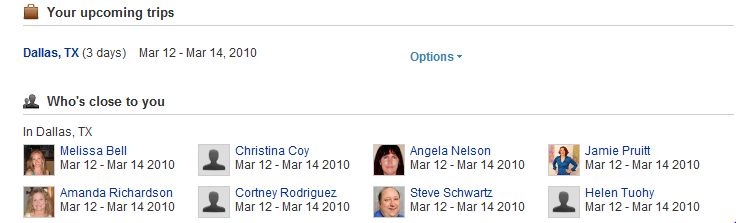
For an upcoming trip to Dallas, my contacts that will also be there are identified.

4. Update and Engage Frequently
Think of LinkedIn marketing efforts as you would blog, Twitter or Facebook marketingefforts: The more activity and interaction, the better the results. To consistently engage with your network:

  • Sync blog posts to your profile with tools like Blog Link or WordPress LinkedIn Application
  • Frequently update your profile with the LinkedIn status feature, much like Facebook status updates
  • Leverage the LinkedIn Question and Answer function – participate in others’ questions and ask your own

5. Promote Your Profile
In order to expand your network, LinkedIn marketing efforts – like anything else – must be promoted in other channels. Include a link to your profile on your website and blog, in individual blog posts, in email signatures and even on business cards. Be sure to optimize your profile for important and relevant keywords. Allow enough of your profile to be public so search engines can rank that content accordingly.

These tips, of course, are just the tips of the iceberg when it comes to LinkedIn marketing tactics. What specific tactics have you found successful for marketing on LinkedIn?

5 Sure Fire Tactics to Promote a Business Blog

Relevant, Consistently Updated Content + Flawless Technical Functionality & User Experience = Perfect Blog Launch

What’s missing from the equation above? You guessed it: blog promotion.

Creating a glitch-free blog with informative content means next to nothing without attracting readers.

Start promoting your blog today with these five effective tips:

1. Involve influential industry bloggers.

By linking to popular blogs, you can gain the attention of both the influential blogger and his or her readers.

But your blog won’t be the only one to benefit. You’ll be giving the other blog a little link juice – and be paying them a compliment at the same time.

Try out a few of these ideas for leveraging other blogs:

  • Create a post around an interesting concept published by an influential blogger:Be sure to attribute the information to the blogger and link to his or her post. And don’t forget to offer additional unique insight to make the post your own.
  • Interview an influential blogger and turn it into a Q&A post: That blogger is sure to link to your post, and his or her readers are likely to visit your blog as a result. Side benefit: Including the insight of a thought leader will help position you as a thought leader as well.
  • Create a list of influential blogs: Include popular blogs from your industry, and include a link, short description and even a screenshot. Online Marketing Blog has successfully done this with its BIGLIST of online marketing blogs. Publish a blog post each week highlighting one or two new blogs to promote the list and acquire another link to the list.

2. Promote your blog via social media.

If your organization already has a solid presence on Twitter, Facebook or other social media channel, leverage your followers or fans to promote your new blog.

For example, when a new post goes live, create a short tweet with a link back to the post – and provide the link on your Facebook fan page.

A few tips to keep in mind:

  • Whenever possible (we know how quickly 140 characters can be used up!), include the blog name in tweets and other social media messages.
  • Auto-feed new posts to your social media accounts with tools like FeedBurner. But if you choose this option, make sure your headlines are as compelling as possible for social media.
  • Maximize promotional efforts by asking employees to add the blog URL to their signatures and personal social media accounts. Employees can also re-tweet posts that they find interesting.

3. Create “link-bait” posts and “sticky” headlines.

Creating compelling headlines or posts that resonate with social web users is another way to garner attention for your new blog.

Try some of these ideas:

  • Write counter-intuitive posts – i.e, “The 10 Worst Online Marketing Ideas” or “The 5 Quickest Ways to Get Caught in the Spam Filter.”
  • Incorporate celebrities into posts (if appropriate for your industry) – i.e., “Top 10 Celebrity Tweets of the Week”
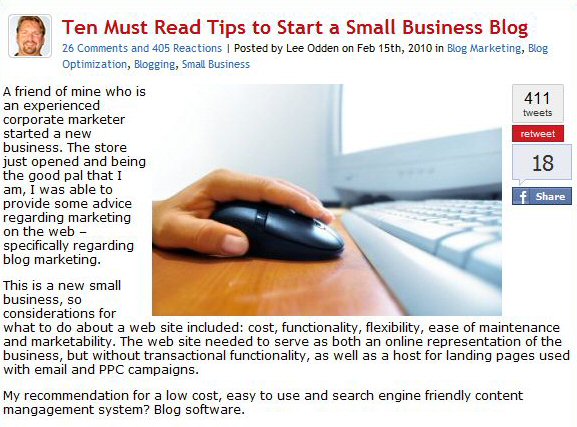
  • Leverage the sticky headline formula, “number + adjective + sticky message” – i.e., Lee’s recent post, “10 Must Read Tips to Start a Small Business Blog” (see image below)

4. Promote the blog on your corporate website.

It’s important to gain some valuable real estate on the homepage of your corporate site – particularly in the early stages of getting a new blog up and running. Create a button with a link to the blog to appear on the homepage, or at the least provide a link to the blog in the nav. The Otter Group does a good job of promoting its blog on the homepage of its corporate website (see image below).

In addition to the homepage, ensure the blog is included in the upper and right-hand nav on all website pages. The goal is to make it as easy as possible for visitors to find your blog.

5. Promote the blog offline.

For all of the online channels available to promote your blog, there are just as many offline channels to leverage. Don’t limit yourself to the online world. Instead:

  • Add your blog URL to business cards.
  • Promote your blog at industry events.
  • Get print publications to pick up blog posts.
  • Use word of mouth to let customers and business partners know of the new blog.
  • Include the blog URL in the boilerplate of press releases (and in online releases, too).

Of course, these five tips are just a few of many ways to promote and market business blogs. Whatever promotional efforts you choose, look for tactics that will help you reach business goals whether they are increasing awareness, garnering buzz in the media or driving additional website traffic.

What tactics have you used to promote your blog?

Meta Tagging as an SEO Technique

During the early days of the Internet, much weight was placed on meta tags as they carry vital information that let users know of the content of a given website. Nowadays it seems meta tags are increasingly being deemed unnecessary.

A lot of people started implementing dubious means in an effort to push their rankings higher, often placing deceiving information in the tags. Meta tags are so susceptible to spamming that it practically renders the tags useless.

Consequently, most of the major search engines like Yahoo and Google done

How to get repeat traffic

1. Make sure you update all of the pages on your site frequently. Unchanged sites can be dropped by some sites and nobody wants to go onto a site and see something last updated in 2005 do they? It could be a good idea also to put a last updated counter so it shows to people you update it a lot so they will check back.

2. Allow customers and visitors to your site to be able to sign up for discounts and special offers. Put a form on your site to allow them to be able to sign up for a weekly, fortnightly or even monthly newsletter which they may be interested in.

3. Add a link to allow people to add your site to their favourites or send this to a friend, it will remind people about your site when they take a look in their bookmarks and think “Oh look, I wonder if this site has any updates”

4. Make your site stand out. Use a great brand with a great logo design so it sticks in peoples heads. Some of the best companies in the world have the simplest logos but everybody can remember them.

5. Make sure that your site is easy to find if people forget the address. I have wanted to visit a website but could never find it. The best thing to do is put links so users can add your site to social bookmarking sites, so even if their computer dies they will be able to find their way back.

6. Never spam anybody who has signed up for a newsletter. If people no longer wish to receive these then make sure you do take them off the mailing list. This makes you look respectful and that you are not a cowboy who will just spam peoples’ inboxes to try and sell their product or get the odd page view.

7. Make a “Whats New?” section. People will instantly go to this to take a look at what has recently been updating and following on from earlier they will like a site that is always updated and will probably come back to take a look at what is new and what has been updated.

8. RSS Feeds. Make sure you have one of these bad boys as they are amazing for repeat traffic. They will let people know what has been updated and when and if people have subscribed to them they are 99% likely to come back to your site when they see an update pop up on their RSS Reader.

Professional SEO Companies

SEO is a continuous process which requires a huge amount of effort and time dedicated in regularly updating and revising a website. This can be a tedious work, most especially for beginners who are up against a very tight competition. However, through reliable companies that offer services for search engine optimization, even starters can get high ranking and increase traffic volume to their sites. All it takes is to choose the right SEO company to handle your needs and maintain your site. But how do you really know which company will provide the best services to your advantage?

First off, determine if the SEO company in question is able to gauge its own ability and giving its own rank as a company. It is best to know if the company positions itself as a reliable one, but still make sure to be wary of their proposals. Oftentimes, companies who assure to get your site fully optimized in just a span of four weeks are giving false promises and unrealistic goals. A dependable SEO company should be able to help you set realistic goals, familiarize you on how search engine promotion occurs and how positioning is calculated through algorithm.

Moreover, SEO involves a lot of technical jargons. The company must be able to explain to you what these terms mean in a straightforward and comprehensible manner.

When hunting for a SEO company, ask if they can provide you with analysis reports regarding your website

The Best SEO Tools

There are many Free SEO Tools on the internet as well as tools that you will have to pay for. There are tools which can submit your site to 100’s, even 1000’s of link and article directories at the same time, toolbars which will check page ranks and sites which will check page rank, backlinks nd give an estimated value of your site all in one go.

Here are a few of the best SEO Tools:

Page Rank Checkers / Backlink Analyzer

dnScoop is a website which shows you a few statistics about the SEO state of your website. It shows you Google Page Rank, Inbound Links, Domain Name Age, Domain IP Report (See which other sites are hosted on the same server)


Page Rank Predictor – Want to find out what PR your site will have? Try here. I would not take this guesstimate as an accurate prediction though, more like a bit of fun.

Keyword Tools

Keyword Suggetion Tools – This tool will show you links to suggested keyword monthly search volumes and much more, so you can see what terms are searched for most on all of the search engines.


Hittail – Hittail tells you what keywords your visitors you are using to find your website from search engines. It also suggests what you should optimise your site for. It can be as easy as putting these terms in a ir tag and they will help a lot.

Firefox Plugins

Live Page Rank - – This is a plugin which will display the Google Page Rank of the page you are viewing in the bottom right hand corner.

SEO For Firefox - – This will show up when you do Search Engine searches, under each search result it will show information like Page Ranking, links in DMOZ, Backlinks, Technorati links and .gov links.

Blog Tools

Everytime you post on your blog you should ping. These sites will help you get in the largest blogging directories online.

Free SEO Google Desktop Gadget

To help keep you up to date with Free SEO Articles we have created a Google Desktop gadget which will allow you to have a box in the corner of your screen (or on your iGoogle) page which will keep you up to date with all of our latest articles.